FlyBrand
Watch the video

FlyBrand for Shopify

Your AI marketing team for Shopify

An AI marketing team that turns restocks, launches and sales dips into plans you approve in chat.

Free plan available · Billed through Shopify · English and Turkish · App Store listing in review

Watch FlyBrand for Shopify

Inside your Shopify admin

Install, open, and your team is ready.

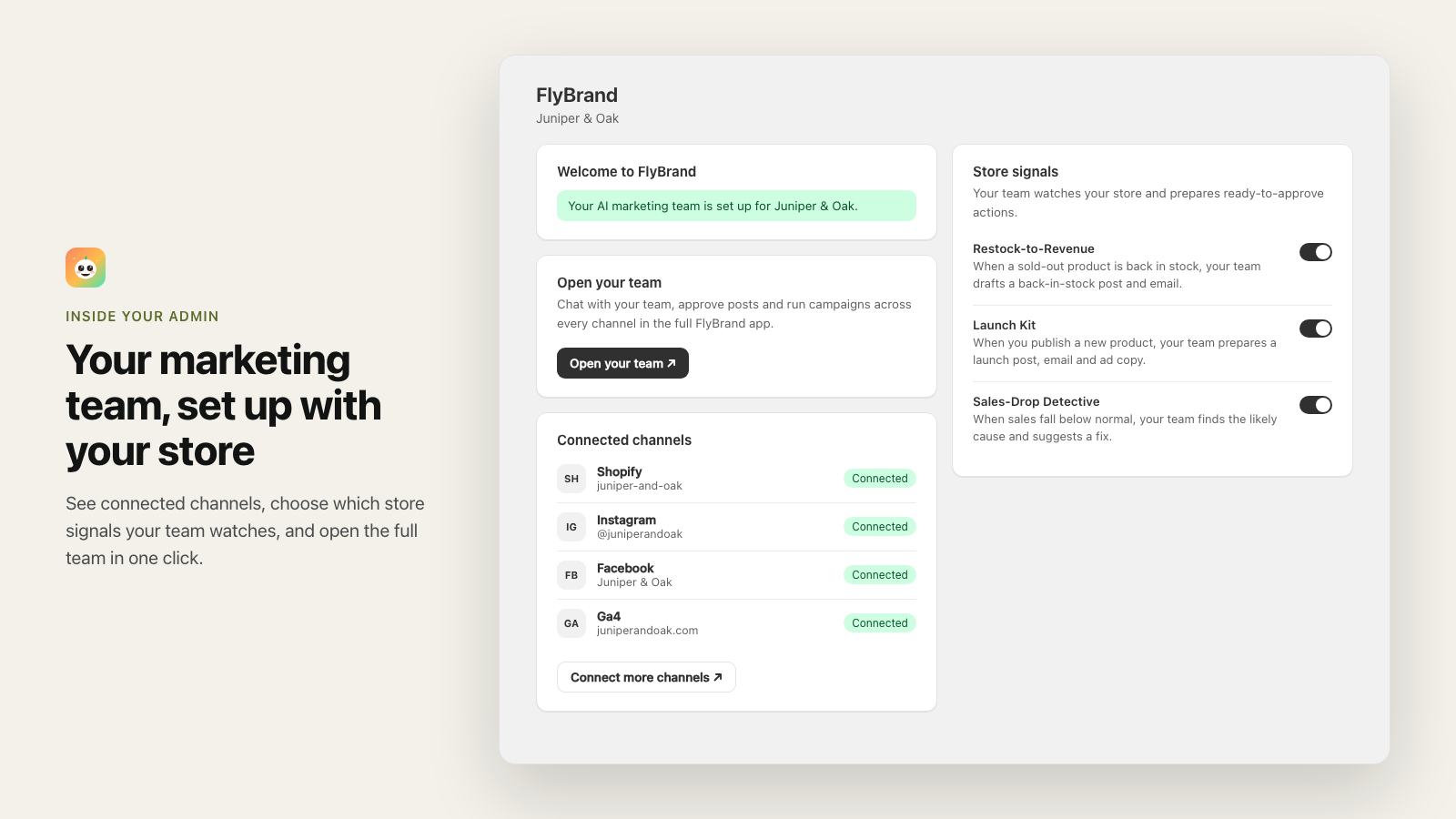
No separate sign-up. FlyBrand creates your workspace from your store, connects it and starts syncing products and orders. The home page shows your connected channels and store signals; Open your team takes you to the full app, already signed in.

FlyBrand home inside the Shopify admin: welcome banner, Open your team button, connected channels and store signal switches.

Store signals

Your store moves. Your team gets to work.

Three moments in your store become ready-to-approve plans in the team chat.

Restock-to-Revenue

Back in stock? The package is ready.

When a sold-out product's stock at a location goes from zero to available, your CMO prepares one approval card for it.

  • Instagram post and story drafts
  • A back-in-stock email draft
  • A Meta retargeting ad suggestion, created paused
  • Only for products that are active and in stock
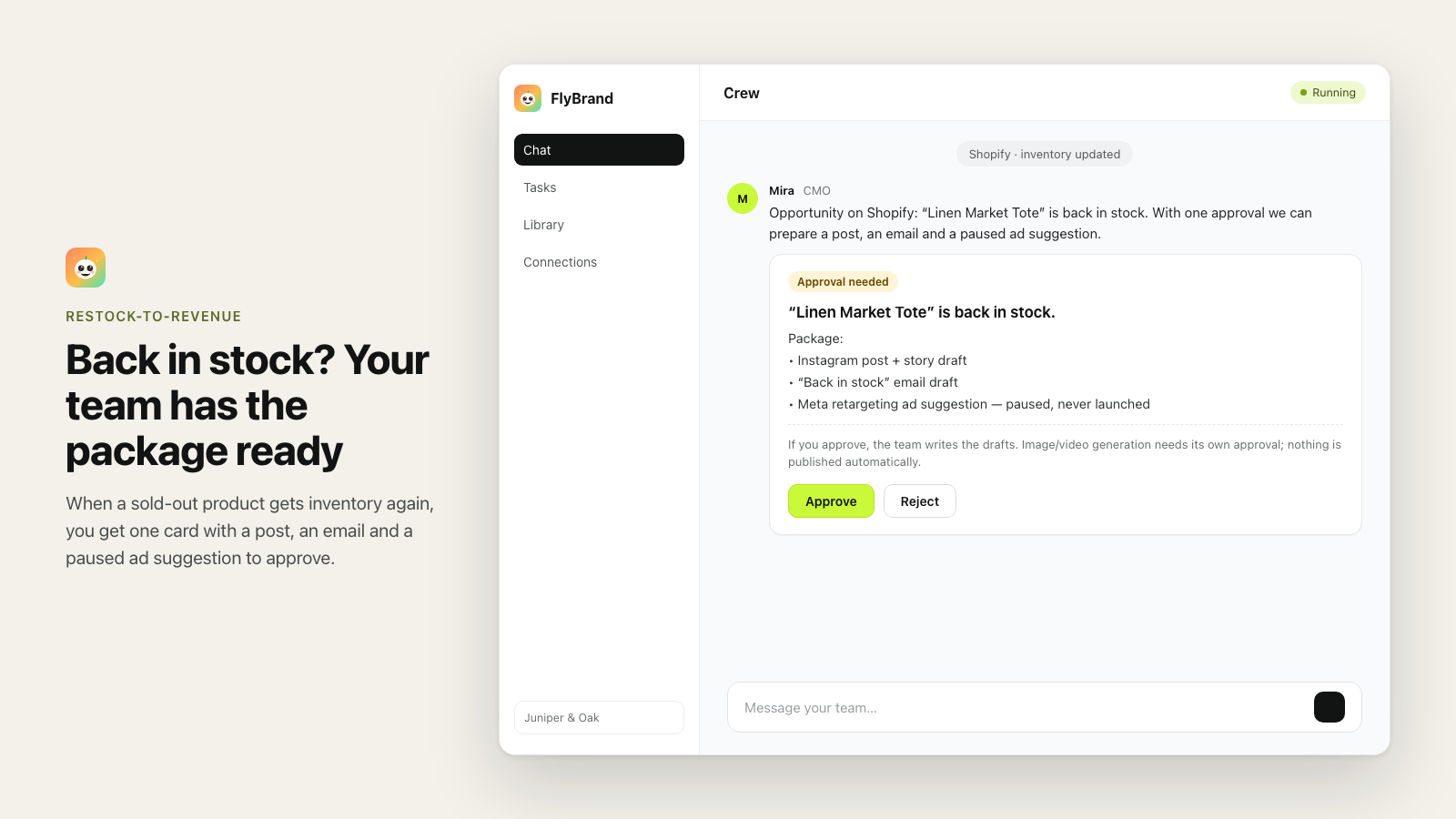
Team chat where the CMO offers a back-in-stock package for a product, shown as one approval card.

Launch Kit

A 7-day launch plan for every new product.

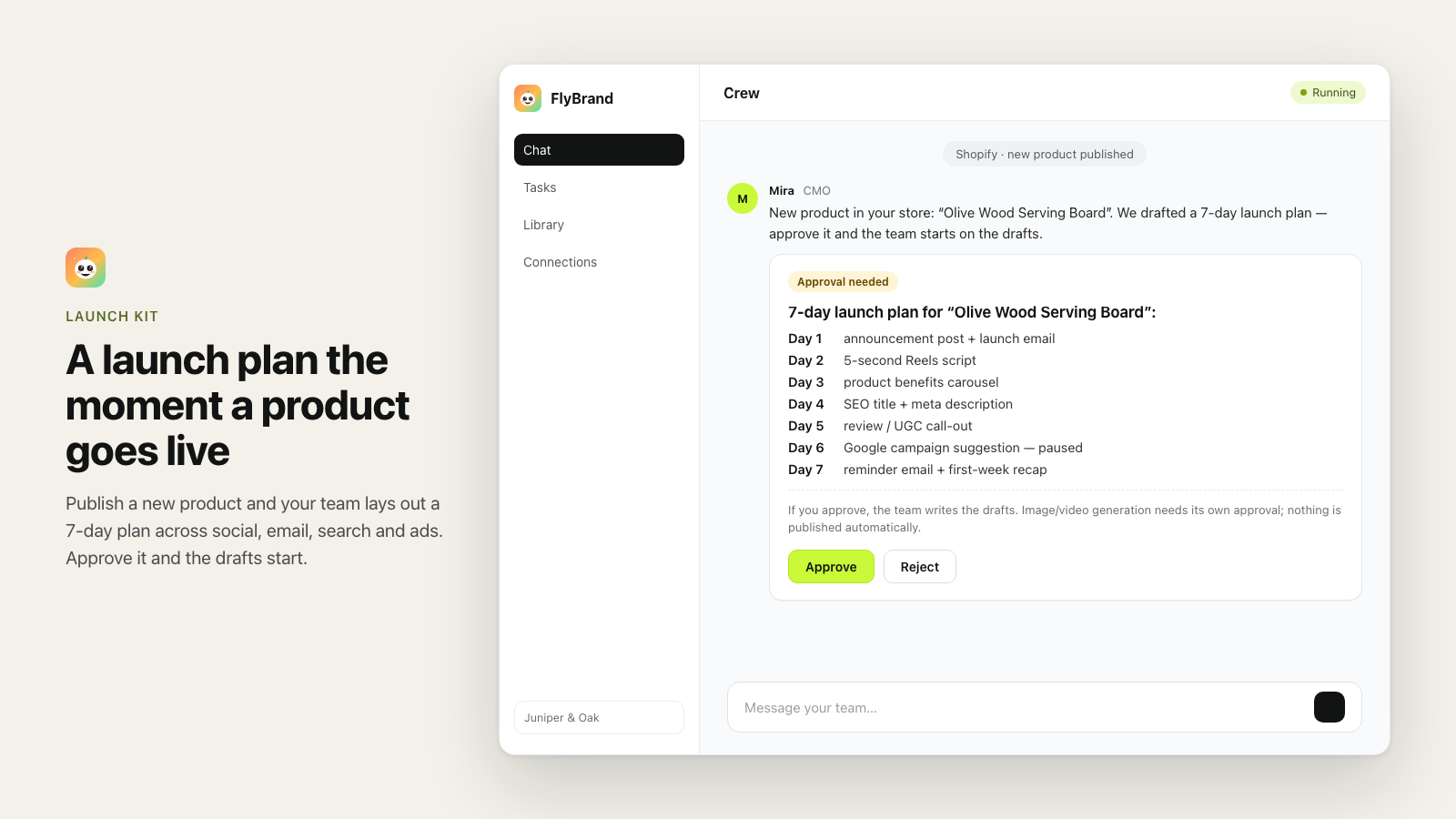
Publish a new product that is active and in stock, and the team drafts a week of launch work, from the announcement post to the reminder email.

  • Day-by-day plan you approve in one card
  • Captions and emails in your brand voice
  • Draft products or products without stock are skipped
A 7-day launch plan for a new product, from announcement post to reminder email, waiting for approval.

Sales-Drop Detective

Orders dipped? Find out why.

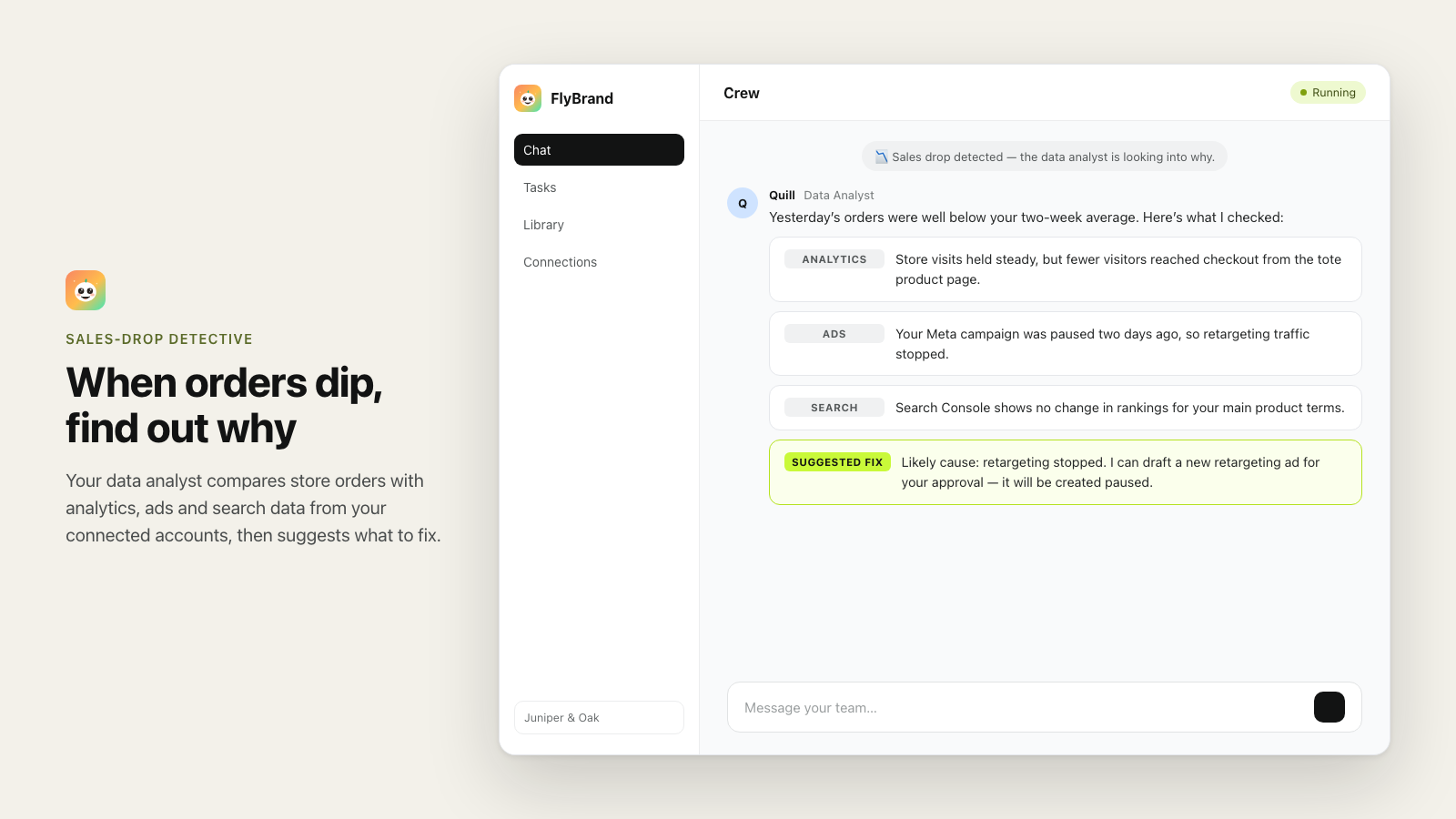
Once a day the team compares yesterday's orders and revenue with your recent average. If they are well below, the data analyst checks your connected analytics, ads and search data and suggests a likely cause and a fix.

  • Reads your connected analytics, ads and Search Console data
  • Explains the drop in plain language
  • Suggests what to do next
The data analyst explains a drop in orders using analytics, ads and search findings and suggests a fix.

Chat with your team

Ask for a post. Get it on-brand.

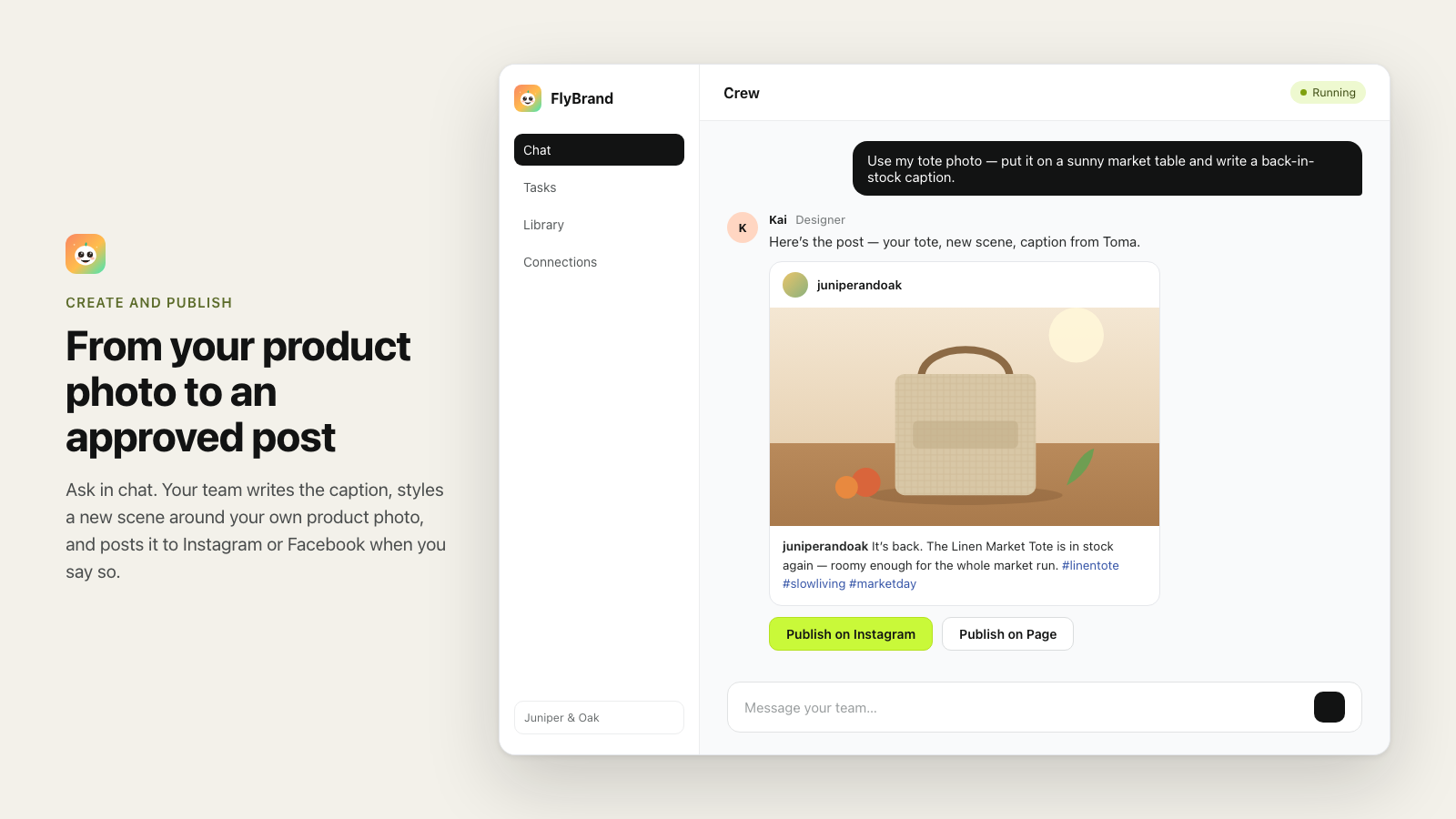
Write captions and emails and create on-brand images in chat, including new scenes built around your own product photos. You see a preview before anything goes out.

An Instagram post preview created from the merchant's product photo, with buttons to publish on Instagram or a Facebook Page.

Beyond Shopify

One team across your channels.

Connect the tools you already use. The team reads your analytics and ads data and works on your social and email channels.

  • Instagram
  • Facebook
  • Meta Ads
  • Google Analytics
  • Search Console
  • Klaviyo
  • Mailchimp
  • YouTube
  • Google Adscoming soon

You stay in control

Your store, your call.

Nothing publishes without you

Every post and ad waits for your approval in chat, one action at a time. Email campaigns are saved as drafts in your own Klaviyo or Mailchimp, and you send them from there.

Ads are created paused

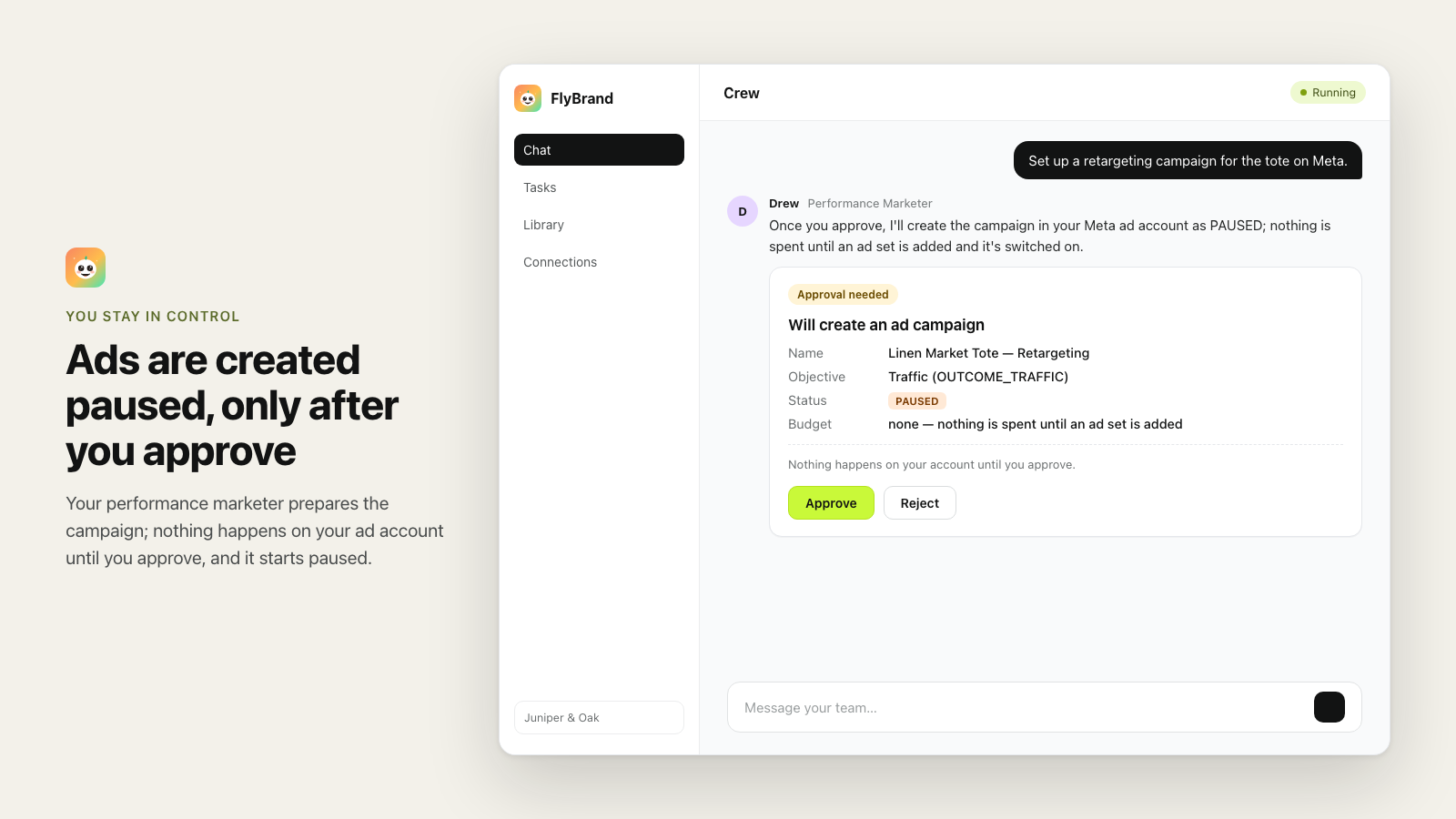
New ad campaigns are created only after you approve them, and always with status PAUSED. FlyBrand never starts spending on its own.

Usage is capped in Shopify

Extra usage is billed as Shopify usage charges with a hard cap you approve. When the cap is reached, generation pauses.

An approval card for a Meta ad campaign that will be created with status PAUSED.

Pricing

Simple plans, billed through Shopify.

Every plan renews every 30 days. No free trial; start on Free and upgrade from the Plan page in the app.

Free

$0/ 30 days

  • $2 of AI generation included every 30 days
  • Store signals: back in stock, new product launch, sales drop
  • Chat with your AI marketing team
  • Generation pauses when the included amount is used

Starter

$49/ 30 days

  • $30 of AI generation included every 30 days
  • Up to 10 brands
  • Everything in Free
  • Extra usage billed through Shopify, capped at $50 per 30 days

Pro

$99/ 30 days

  • $70 of AI generation included every 30 days
  • Up to 25 brands
  • Everything in Starter
  • Extra usage billed through Shopify, capped at $100 per 30 days

Usage beyond the included amount is billed at the AI provider's cost for that generation plus a service margin, and never exceeds your plan's usage cap. Free has no extra charges.

FAQ

Questions from Shopify merchants

Does FlyBrand post or spend money on its own?

No. Posts are published to your Instagram or Facebook Page only after you approve that post. Email campaigns are saved as drafts in your own Klaviyo or Mailchimp; FlyBrand does not send them, does not add subscribers and does not email your customers from its own servers. FlyBrand never spends ad money on its own: new ad campaigns are created paused and only after you approve, and launching a campaign or raising a budget needs your approval too.

What do I need to connect?

Your Shopify store is connected during installation. To publish and to get cross-channel analysis, connect Instagram, Facebook, Meta Ads, Google Analytics, Search Console, Klaviyo or Mailchimp from “Connect more channels”.

When do store signals fire?

Back in stock: when a product's stock at a location goes from zero to available. Launch Kit: when a new product is published and active with stock. Sales drop: once a day, when yesterday's orders or revenue are well below your recent average.

Do store signals cost anything?

Preparing the approval card is free. When you approve, the team writes the drafts and that work counts as usage. Image and video generation always asks for its own approval. The daily sales-drop analysis counts as usage.

How is billing handled?

Through Shopify. Plans renew every 30 days and there is no free trial. Usage beyond the included amount is billed at the AI provider's cost plus a service margin, and the cost of each generation is shown in the app. Change or cancel your plan on the Plan page inside the app.

What happens to my data if I uninstall?

The access token is deleted immediately and syncing stops. Shopify asks us to erase store data 48 hours later and we delete it. See the privacy policy. Shopify store data

Which languages are supported?

English and Turkish.

More help on the support page or at support@flybrand.app.

Give your store a marketing team.

Start on the Free plan. Upgrade when it pays for itself.